Release Notes 2026
October 2026
September 2026
August 2026
July 2026 Release
June 2026
May 2026
April 2026
March 2026
February 2026
Frequently Asked Questions!
How do I see descriptions of codes in enquiry screens?
How do I access field level help?
How can I delete a payment run
How do I stop over receipting of orders
Why has my transaction not appeared on the payment run?
How do I stop a user posting to a prior and future period
How to copy and delete lines during data entry?
Prevent user posting to specific balance classes
Download Templates
User setup requires multiple screens and is complicated!
Changing security access to a user
Out of office
How do I give a user read only access?
De-allocate and an AP Payment
Can I run a report to view security groups against my users?
Hints and Tips!
Useful information to include when raising Financials cases
Navigation Hints and Tips
Browse Timeouts
Accounts Payable Quick Cards
Accounts Payable Supplier File
Accounts Payable Data Entry
Log Invoice/Credit Note
Enter a logged Invoice
Non Purchase Order Related Invoice Entry
Order Related Invoice
Order Related Invoice with Mismatches
Order Related Invoices - mismatch scenarios
Mismatch Types
Invoice and Credit Note Matching
Accounts Payable Enquiries
Accounts Payable Payments
Payment Processing
AP Payment Cancellation
Create a manual payment
Re-run Bacs Remittance
Cancel a full BACS payment.
Payment Processing Audits
Single Supplier Payment Processing
Transaction Maintenance
CIS Processing
Accounts Payable Code Tables
Accounts Receivable Quick Cards
Customer Maintenance
Data Entry and DDI Mandates
Enquiries
Cash Allocation
Credit Control
Student Sponsor
General Ledger Quick Cards
Chart of Accounts Setup
Create a new nominal code
Create management and analysis codes
Creating and Amending Nominal and Management code relationships
Create a new GL Structure Element
General Ledger Data Entry
Journal Entry
Journal Upload
General Ledger Journal Multi Level Authorisation
Modernisation Budget Upload
General Ledger Enquiries
Account Details
Trial Balance
GL Enquiries - Balance Sheet & Profit and Loss
Enquire across multiple years
Transactions Enquiries
Period and Year End Close
General Ledger Security
General Ledger Tax Journals
Fixed Assets Quick Cards
Prompt File - Asset Creation Updated
Fixed Assets Period End & Depreciation Updated
Revaluation
Disposals
Relife
Purchasing Management Quick Cards
Inventory Management Quick Cards
Return to Store
Stock Taking
Create Demand on Store (Financials)
Bin Transfers
Stock Disposal
Stock Adjustments
Import Tool Kit
Reconciliation Processes - Helpful how-to guides
Daily Checks
General Ledger Reconciliation Reporting
Accounts Payable Reconciliation Reporting
Accounts Receivable Reconciliation Reporting
Fixed Assets Reconciliation Reporting
Purchasing Management Reconciliation Reporting
Procurement Portal
Procurement Portal Overview
Navigation
Requisitions
Orders
Authorisation
Receiver
Invoice Clearance
Portal Administration
Procurement Portal – Teams Setup
Invoice Manager
Bank Reconciliation
Bank Reconciliation Overview
Bank Reconciliation Menus Explained
Bank Reconciliation Company Controls
Bank Reconciliation Code Tables
Transaction Types and Sub Types
Bank Reconciliation Enquiries
Bank Reconciliation Reports
Manual Bank Reconciliation
Bank Reconciliation Take-on
Unmatching Transactions
Reporting
General Ledger Reports
Account Payable Reports
Fixed Assets Reports
Sales Invoicing Reports
Accounts Receivable Reports
Bank Reconciliation Reports
Purchase Invoice Automation (PIA)
February Release
March Release
January 2026
Deleting Supplier training data
Resetting password - Smart Workflow
Purchase Invoice Automation (PIA)
Adding a New User - Smart Workflow
Password Reset in Smart-Capture
How to Create a New User in Smart-Capture
Reprocessing Failed OCR Supplier Invoices
Smart Capture Email Configuration Overview
Configuring Smart Capture to use Gmail in the Web UI
MAP Configuration Non-Microsoft and Non-Google Accounts
Configuring Smart Capture to use Microsoft 365 (Graph API) in the Web UI
Suggested Testing Areas
Release Notes - New UI Improvements
June Release 2024 - New UI Improvements
May Release 2024 - New UI Improvements
April Release 2024 - New UI Improvements
Release Notes 2025
December 2025
November 2025
October 2025
September 2025
August 2025
July Release
June Release
May 2025
April 2025
March 2025
February 2025
January 2025
Release Notes 2024
December 2024
November 2024
October 2024
September 2024
August 2024
July 2024
June 2024 Release
May 2024 Functional Changes
Financials Design Improvements
User Interface Overview
Chart Functionality
User Preference Improvements
Alerts & Field Error Focus
The all new Data Grid!
Input Fields & Dynamic Validation
Screen Structure
Miscellaneous New Features
Generic Actions
Bring Your Own BI (BYOBI)
Collaborative Planning
Financial Reporting Consolidation
Flow Headstart Forms
Request a Customer
Request a Supplier
Request a Sales Invoice
Request a Management Code
Request a nominal code
Create a Pay Request
API
Air Approvals
Contents
- All categories
- Release Notes 2026
- October 2026
October 2026
 Updated
by Caroline Buckland
Updated
by Caroline Buckland
Financials October Release
Release Notes
This document contains details of new and amended functionality included in the software update deployed on 12th October. We've rolled out the following enhancements this month.
· Accounts Receivable User Data
· Validation on Duplicate Location codes
· Non mandatory VAT codes on Customers
· Portals – new setting to define GL account when using Item codes
· GL Journal screen change
· AFX Updates
External References for Accounts Receivable Transactions
Details of the change
We have now delivered the final part of the extended data fields for Accounts Receivable Transactions. Follow the link the below to learn how to set this new feature up.
Details
Enhanced User Data for Sales Invoices
We've introduced a new capability that allows user data created for Sales Invoices to be seamlessly extended to Accounts Receivable (AR). As a result, the data will now be automatically passed through from the Sales Invoice to AR.
We recommend configuring SI Extended User Data and AR Extended User Data in the same manner for both transactions and items. This unified approach ensures that data is accurately and efficiently transferred between the two systems.
Current Limitations
Please note that these extended user data fields are not currently accessible via APIs or Jasper reports.
April 2026 - Help | Financials
Duplicate locations – Purchasing
Details of the change
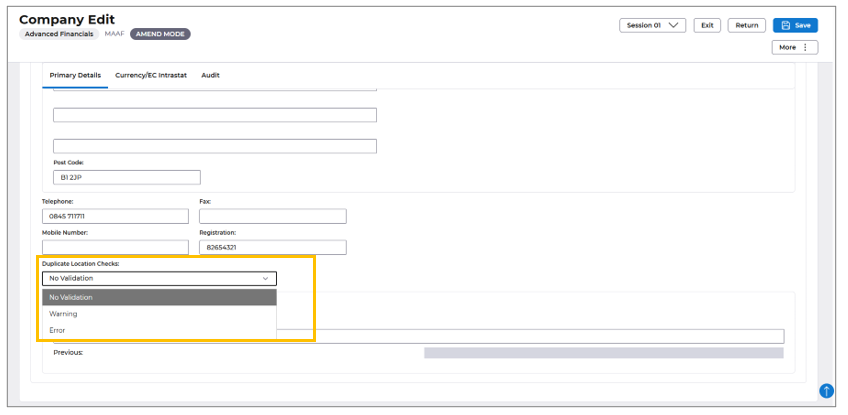
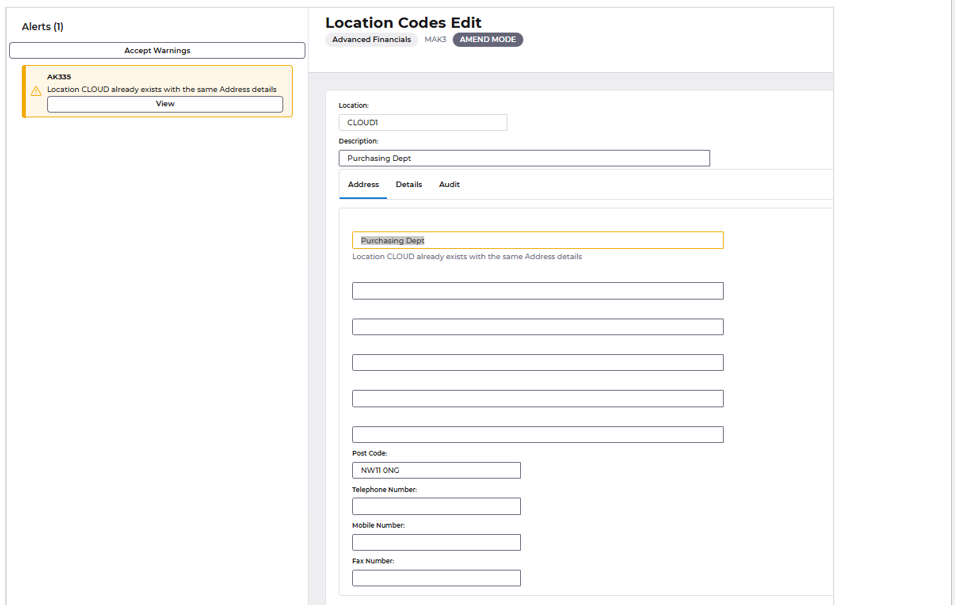
We've introduced a new feature that enables postcode and address line one validation for location codes. This enhancement allows you to configure a setting that displays a warning or error message when a user tries to create a new location with a postcode and address line one that already exists. This improvement helps maintain data integrity and prevents duplicate location codes being created.
To make the most of this feature, you can adjust the setting according to your needs, choosing between a warning or an error message, depending on your organisation's requirements.
Setup
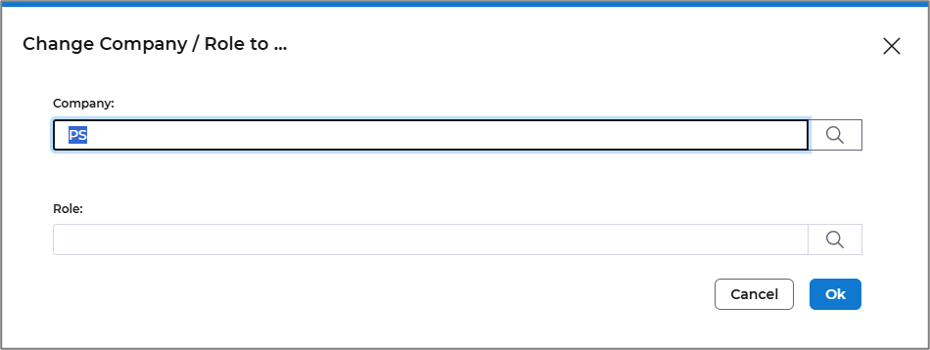
Select Change Company/Role button

Enter your company code in the window and then select F4 on the keyboard.
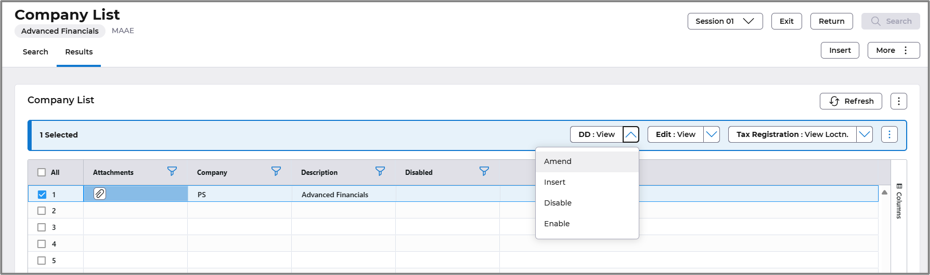
Select the Edit>Amend action.
Select from the drop-down menu to this set as a warning, or error for any duplicates entered.
When setting up new Location codes with the same Postcode and address line one, the following message are displayed.
Non mandatory VAT codes on Customers
Details of the change
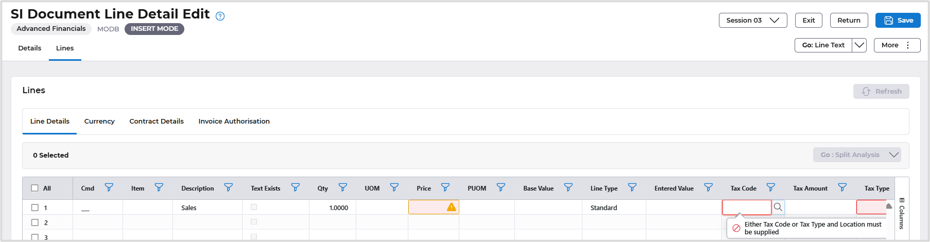
We've introduced an update to our Accounts Receivable feature, providing greater control over VAT code entry during data entry. This new functionality allows you to configure a setting against a specific customer, ensuring that users are prompted to manually enter a VAT code rather than the default code associated with that customer.
This change was applied to Suppliers in the September Release.
For more details select the link September 2026 - Help | Financials
Exclusions
Any system generated transactions that require a tax code (e.g. AR generated interest charges) will continue to use a default tax code as the user has no interaction with these transactions.
Additional changes will be required to the API’s and reporting for the new customer and supplier control changes for the new indicator to control data entry defaulting of tax codes.

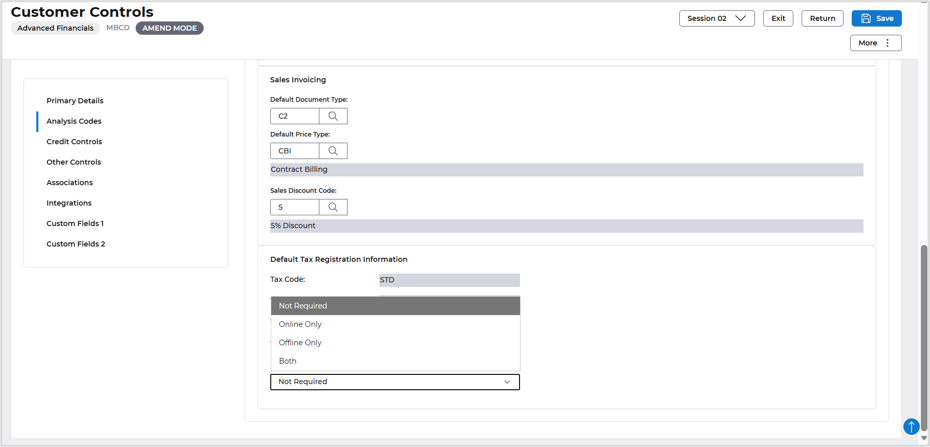
Tax code entry is then a mandatory entry when creating documents.
Portals – new setting to define GL account when using Item a default item
Details of the change
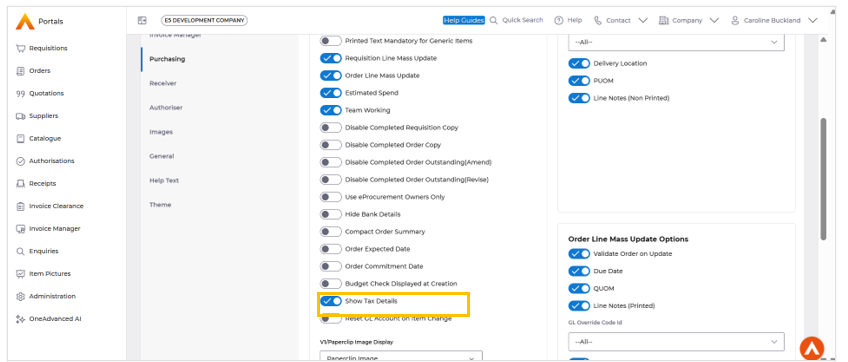
The GL account can be cleared and then automatically re-defaulted on the Requisition and Order Basket screens when the Item code is updated. This functionality can be controlled through configurable system settings on the Administration tool.
Here's how it works:
When the Setting is Off
- The GL account will not be cleared when the Item code is changed.
When the Setting is On
- Entering an Item Code: If you enter an Item code for the first time, the GL account will be cleared.
- Removing an Item Code: If you remove an Item code that was previously entered, the GL account will not be cleared.
- Changing the Item Code: If you change the Item code, the GL account will be cleared.
- Not Changing the Item Code: If you don't change the Item code, the GL account will not be cleared.
This behaviour applies to both the Orders and Requisitions screens.
Setup
A new toggle control has been added:
Administration → Purchasing → Reset GL Account on Item Change
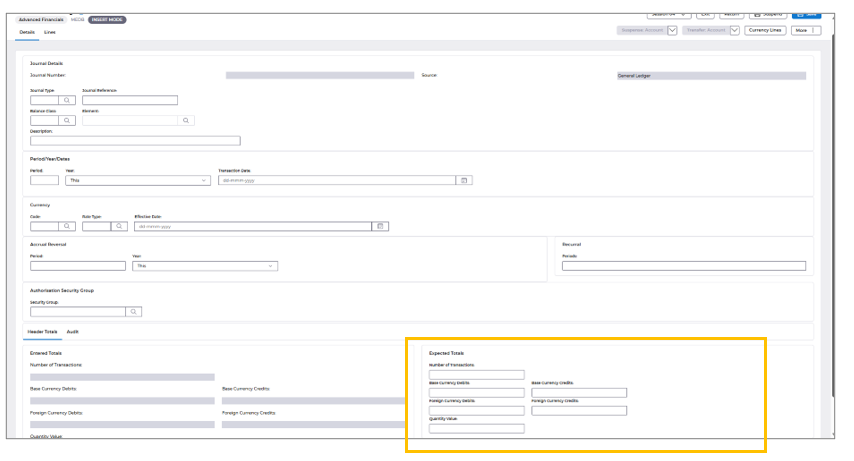
Journal Data Entry
Current Version
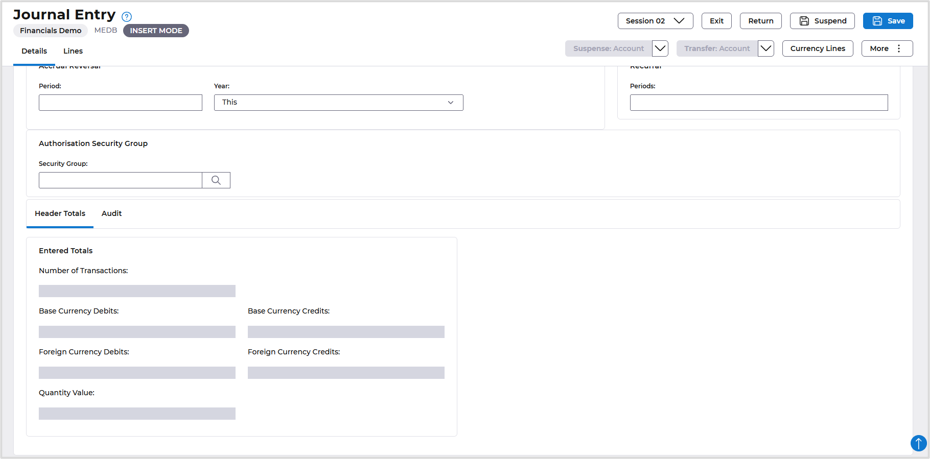
New Version – expected total fields added
AFX Updates
- Improved accessibility in the Supplier List – Drawer treeview by ensuring the aria-labelled by attribute references a valid, unique ID that exists in the DOM and provides the intended accessible name (EFIVE-39554).
- Enhanced the Supplier List – Drawer treeview structure by ensuring that only valid tree child roles, such as treeitem and group, are used within the tree hierarchy (EFIVE-39555).
- Improved accessibility of the Supplier List – Drawer menu search by updating the label or ARIA attribute to reference a valid, unique ID in the DOM and correctly associate the label with the search control (EFIVE-39557).
- Fixed an issue where the Due Date was not populating on the Invoice Header after validation in AFX, ensuring the expected due-date information is displayed correctly (EFIVE-40631).
- Fixed an issue with the Calculator function incorrectly rounding off values in lines, ensuring calculated values retain the expected precision (EFIVE-40756).
