January 2026
 Updated
by Caroline Buckland
Updated
by Caroline Buckland
What's New: Key Changes, Features, and Fixes
We're excited to share with you the latest updates to our product. The attached document provides a comprehensive summary of the key changes, new features, and fixes included in this 9.5.2 release.
Web Application
Improved speed of report dashboard loading
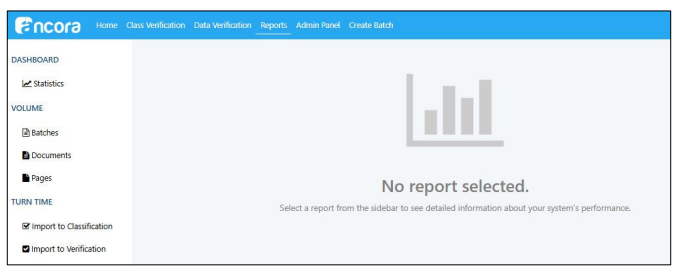
The Reports area provides a variety of reports from different perspectives of system performance as batches are processed in the system. Larger environments were seeing performance issues with database utilisation spikes occurring when the Reports screen was loaded. We have improved the efficiency of the queries used in the Reporting dashboard and moved the queries to be run against the Reporting database rather than the main application database to resolve this issue, allowing users in larger environments to be able to see batch statistic reporting without causing performance issues. We have also made a minor change when the Reports area is accessed. Now when you access the Reports area, the dashboard doesn’t load by default. You can click the Dashboard > Statistics link to see the dashboard values that loaded by default previously.
Admin Panel
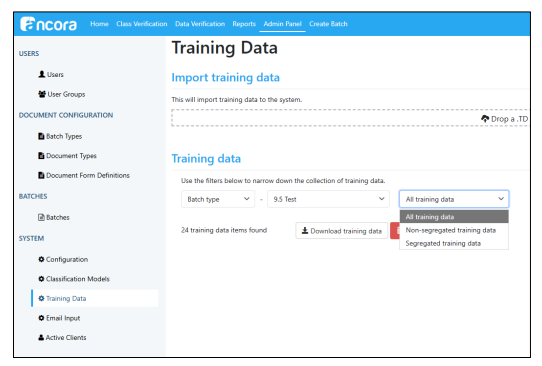
Training Data export now supports Segregated / Common / All filters
We have improved how training data can be exported , by adding the options to export Segregated data, data that is common and not segregated, or both.
Data Verify
Batch list loading improved for high batch volume (chunking + dynamic timeouts)
Customers with a large number of batches were periodically having issues with the count of batches failing to load on the Dashboard, as well as the list of batches on the Select Batch screen in Data Verify. We identified the issue to be related to the default chunk size used of 50 batches when gathering this data. To address this problem, we have reduced the chunk size to 15 batches for each iteration and there is a separate dynamic timeout detection that is executed on each iteration.
Email Input
Email Input XML→HTML/XSL→PDF visualization support for eInvoice rendering
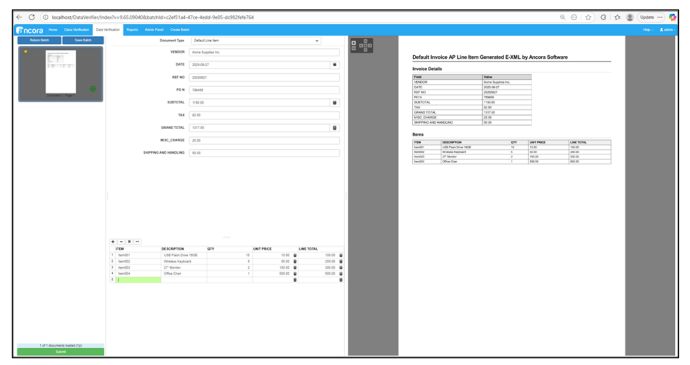
In release 9.5 we added support for XML based invoice processing. As part of this we created a process to visualise an eInvoice. We have added the functionality to render XML invoices to HTML using the file transform.xsl which is then converted to PDF via the process wkhtmltopdf. The invoice now displays in Data Verify in the viewer and is included in the export. Example:
Emails without attachments can now be automatically routed to Errors (ErrorOnMissingAttachment)
We have added an option to move emails that don’t have attachments to an errors folder. When the option is enabled, emails without attachments are moved to the Errors folder. Emails with attachments are still handled as normally.
Email body PDF timestamp now respects mailbox time zone or UTC setting instead of server time zone
Previously, when configured to import the Email Body as part of an email batch, the Email Input client was setting the Date value in the header to a date-time based on the time zone of the Server or database it’s connected to, instead of the expected time zone of the inbox being polled. This was problematic for any customer using this date-time to signal when emails are being received, as the resulting email body page was future dated. We have updated the Email Client to assign the date-time stamp based on the mailbox time zone or UTC setting instead of the server time zone.
Image Processing
Foreign key relationship maintained between InputFilePage and Page (for new pages)
We added a new column in the Page table with the name InputFilePageID. The new column is populated when the server inserts entries into the page table, maintaining a foreign key reference to the inputfilepage. This provides a stronger chain of custody between system input and output.
Web Admin
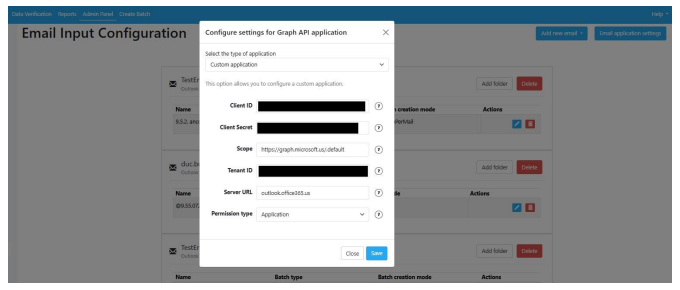
Added support for Email input with Azure GCC High Tenants
We have added support for the Email Input application to connect to Azure GCC High tenant email boxes.
Fixes
Segregated Training Data auto-generation behaviour fixes
Previously, when DFD segregation was activated, the Server service needed to be restarted for the training data to be segregated from the common training data. We have updated the functionality so that when DFD segregation is activated, the Server now derives segregated training data from relevant common training data without a restart of the server service.
Admin Panel
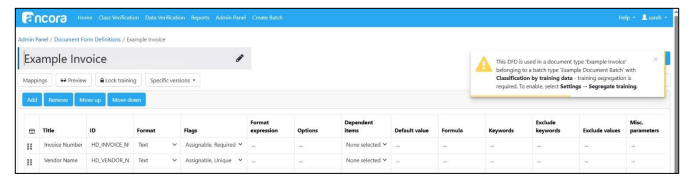
Added warning when segregation is not turned on for Model-less Classification
As part of release 9.5, we introduced the option to use Model-less Classification. One mode that can be configured for a batch to use Model-less Classification is to utilise training data, however this option requires DFD segregation be turned on, otherwise model-less classification will not work for the training data option. We have added a warning in the UI to make administrators aware when a DFD does not have training segregation enabled when it is configured for Model-less classification in the batch type.
User Groups list now displays users per line (no artifacts)
When viewing User Groups, there was an issue with how users would be displayed where there were multiple users. Multiple users were shown with the HTML tag instead of displaying an actual line break after each user in the list. We have corrected this display issue.
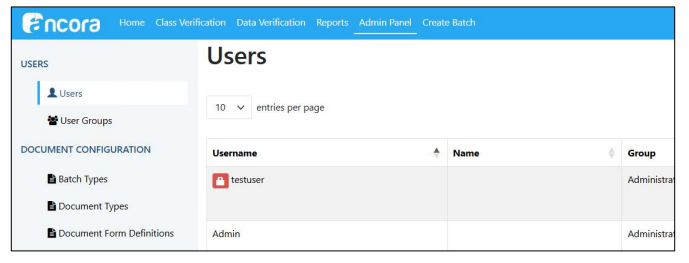
Fixed issue with Admin not being able to unlock locked users via Unlock button
In release 9.5, we added the functionality to be able to reset a locked user account from the Admin panel in the Users screen. In some instances, the unlock button graphic was missing, causing code to be displayed rather than the button to unlock the user account. This issue has been fixed to ensure that admins can reset locked user accounts from the admin panel.
Classification
Stability improvements fixed multiple-pass failures for specific vendor invoices
We identified an issue with a specific vendor’s invoice format, where capture was conflicting with the StrictPosition miscellaneous parameter in two fields, causing the field values to not be captured. We have resolved this issue in this release.
Model-less Classification now provides a mechanism to use existing training data when DFD segregation is enabled
In the initial release of Model-less Classification, enabling DFD segregation (which is required for Model-less Classification) forces the user to do full retraining since those training data related to the DFD are in the “common” or “public” pool (of templates). To address this, we have now enhanced Model-less Classification by providing a mechanism to use existing training data when DFD segregation is enabled.
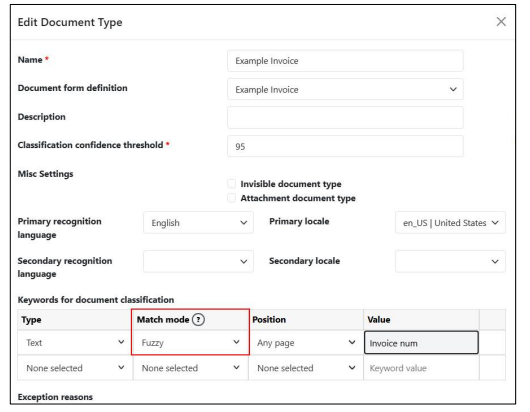
Model-less classification keyword match mode in document type controls keyword fuzziness
Previously with model-less classification, the keyword matching functionality would use fuzzy matching if no direct keyword matches were detected. This behaviour automatically handles common OCR errors, but it may not be suitable for some use cases, especially when searching for fields with very similar keywords.
Providing additional control over the keyword matching functionality allows field-level fine-tuning that could extend the data capture capabilities of the system to support new use cases.
The parameter now has the following possible values:
- Exact - Any fuzziness in the matching algorithm is disabled. An exact match is required. Internal punctuation and internal spaces will be counted as differences in this mode, and the keyword match will fail.
- Regular - Standard fuzzy matching (invariant to character casing and whitespaces) with specific thresholds to the accepted edit distance between the keyword candidate and the keyword list item. The threshold values are dynamically calculated depending on the field search stage, previous training, candidate type, etc.
- Fuzzy - Limited fuzzy matching. Edit distance for significant characters like letters and digits is not allowed. The differences in spacing, character casing, and punctuation characters are allowed
Data Capture
VAT capture stabilised using keyword priority and updated logic
Training was oscillating between one VAT result or the other for a particular invoice type. This was due in part to keyword priority – keywords in a DFD should be configured in order from most specific to least specific.
The improvements can be separated into:
1. Updating the field candidate generation logic to prevent incorrect early stops of the candidate generation, caused by incorrect keyword priorities, without sacrificing performance - Implemented improvements to the segment search logic by refining the early stop mechanism, using a pre-calculated promising candidate validation area. The validation area calculations are based on the maximum possible field location area and the movement of each candidate from the current page.
2. Implementing an implicit automatic keyword priority adjustment logic to address the incorrect keyword priorities without changing the explicit priorities of the other keywords - After this update, the input keywords are dynamically rearranged topologically using containment analysis. This means that the original order (which also defines the priorities) of the keywords is preserved, but if there are lower-priority keywords that completely contain some other keywords with higher priority, then the priorities are dynamically adjusted by moving the longer versions of the keywords before their shorter variants are contained as substrings.
This improvement addresses the issues with sub-optimal keyword selection during the initial training, and better keyword candidates are selected during the assignment of the field. We can implicitly sort the keywords by length, and analyse the keyword collection for string-substring containment cases and correct the priorities accordingly, preserving the initial order of all other keywords for the same field.
OCR date formatting issue corrected, data capture preserves slashes and mixed separators
An issue was identified with a date with a forward slash in it being recorded in Data Verify as a 1. Specifically, a date contained a number, followed by a slash, followed by a space (3/ 6/25). The issue existed because both the slash and the space are recognized as date separators, and there was logic to prevent this. We have updated the logic so that data capture preserves slashes and mixed separators.
Multi-subtotal/VAT vendor capture issue resolved
Issues with consistent capture where there are multiple values for VAT on invoices were identified. We have improved capture performance for invoices that have multiple sub-totals/VAT values.
Document split by capture data improvements
We noticed a problem with documents splitting incorrectly when document separation by capture data was enabled. We discovered that mechanisms designed to prevent false candidates sometimes fail for document separator fields (fields with an activated DocSeparator misc param). This happens because the DocSeparator functionality treats each page of a multi-page document as a separate document, increasing the chance of generating false candidates because some of the false candidate prevention mechanisms are activated only for multi-page documents. We have made improvements to the false candidate prevention mechanisms as required for cases with DocSeparator fields to address this issue.
Data Verify
Invalid characters in Data Verify field no longer cause exception in SdkWrapper
As issue was encountered where invalid characters entered in at Data Verify caused an exception in the SdkWrapper. It was discovered that the text causing the exception contained invisible symbols. Viewing the text in a text editor showed the symbols as black boxes. We have resolved this issue to ensure that invisible characters no longer cause an exception to occur.
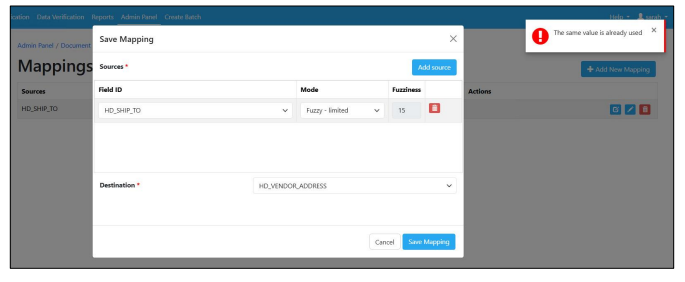
Duplicate mapping values no longer permitted with identical source/destination, and duplicates blocked for imports
An issue was identified where multiple mappings were allowed to be created with identical source and destination values. We have added logic to prevent this going forward.
Data Verify retains field values reliably even during rapid tabbing under latency conditions
In the previous release, we saw an issue with data fields erasing content typed into the field if the content is typed too soon after tabbing or clicking into said field. We have made improvements to speed up processing to be able to avoid this issue in future.
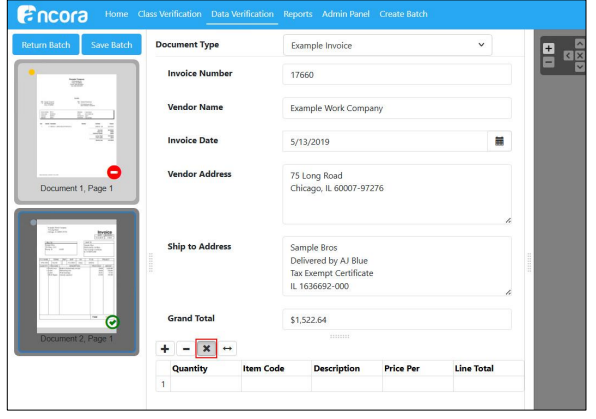
Clear Table now affects only table rows, header fields remain intact
An issue with identified with clearing table rows. If the table of invoice line items was cleared with the “x” button in the UI for the purpose of re-training the columns, which removes the value selected for the Vendor Name field, (a header field, not in the table), making it blank. This issue did not happen if the table rows were instead deleted one row at a time. We have fixed this issue so that the clear table button now only clears data inside the table and not the header values.
Web Verify table multi-select delete improvements (shift-click, select all)
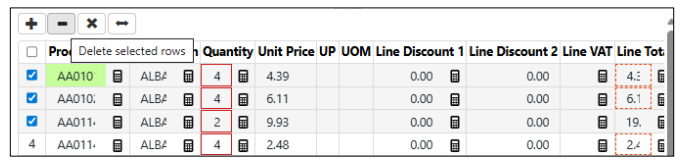
We have added multi-select functionality to tables in Data Verify. It is now possible to select all lines, or select multiple individual lines, to allow for delete of more than one line at a time. Select all option added with checkbox at upper left-hand corner.
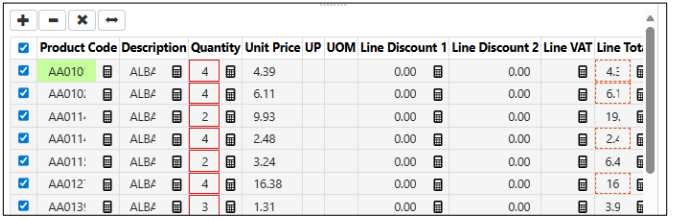
Select multiple rows for delete:
Export errors fixed when Document Types are changed quickly (preventing mismatched exports)
A problem was noted that when an operator uses Ctrl+M to move to the next document, then changes document types in Data Verification before the next document loads and the operator selects the new document type, the export to XML will fail because the document type doesn’t match the captured data’s DFD. With this update, the system now blocks the “Select the next document” (Ctrl+M) operation until the next document is fully loaded and the internal context is fully updated.
DFD
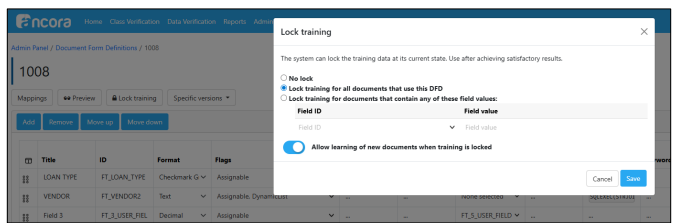
DFD Lock Training behaviour corrected
Previously, locking training data for a given Field Value prevents existing training data from being edited but does not prevent new training data from being generated, which can cause issues in cases where multiple passes would’ve been needed to get that training right. Instead, a new piece of training data is created without the ability to improve upon it. We have updated this functionality. We have added a toggle in the Lock Training UI (accessed while editing a DFD with the button Lock Training) to prevent new training data from being saved when attempted to be generated for a Field Value that’s configured in the Lock Training screen.
Email Input
Accuracy has been improved across Freight documents
An issue was encountered with a Freight value on an invoice not being pulled consistently in data capture. In this release we have improved the data capture accuracy for invoices with a Freight field.
Email Attachment Filter now correctly honours selected file types, including optional ZIP behaviour and mailbox/global precedence
An issue was encountered with Email attachment filter configuration in the Web UI. If you hand select the Email attachment types in the Web UI by clicking on them in the list, you would get all document attachments in the batch, rather than the documents you had selected. Excluding ZIP files from the filter also was not working. We have fixed this filter to work properly with this release.
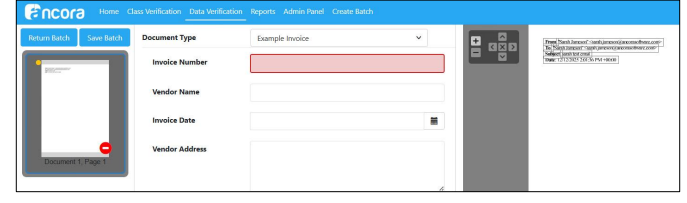
Email body/header PDFs are generated consistently and EML attachments correctly included
Two issues were observed with Email Bodies and EML attachments. Previously, when an email was sent without any content, this resulted in no PDF being created. We have updated the Email Client to include the email header and body when the option is selected to include the email body in a batch, even when the email body is blank. With this change we are now including an email header and the email body even when the email is blank.
Folder input
API-based subfolder ingestion now handles duplicates and malformed subfolders (moves duplicates to Errors)
An issue was identified when attempting to upload an API subfolder that had already been submitted through the input service, the input service would put the batch in the processed folder, but no batch would be created. This had the potential to cause customer issues with missing batches. We have updated the folder input logic so that in the case when a batch is uploaded successfully but a response is not received by the client, the API-based subfolder mode treats that as a failure and moves the folder to “Error files”.
Please contact your Account Manager for more information.
